DungeonBox Guides & Walkthroughs
From first room code to Lion's Labyrinth — every how-to in one place.
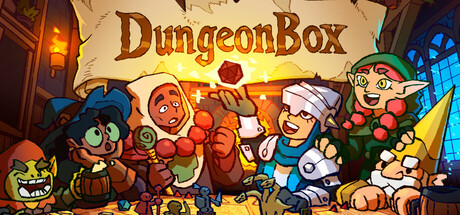
DungeonBox is a party RPG from Foxtail Games LLC built for living-room chaos: one Steam host, up to eight players, and phones as controllers through a room code at dungeon.box. This Guides Hub is the map for every how-to on the wiki. Whether you are checking the demo before the December 1, 2026 Steam release or planning a full night in Lion’s Labyrinth, start here and branch into the guide that matches your job at the table.
Where to start
New hosts should open Getting Started first. It covers installing on Windows or macOS, confirming system requirements, launching a session, sharing the room code, and deciding between Computer DM and Player DM. If guests only need the join flow, send them straight to How to Join so they can open dungeon.box on a phone browser without installing an app or creating an account.
Once the party is seated, How to Play explains the core loop — Join, Answer, Vote, Adventure — plus skill checks on the phone, the d20, and what natural 20s and natural 1s mean in practice. Combat-heavy tables should bookmark Combat & Voting for turn-based fights, card voting, and how the AI narrator (OpenAI GPT-4.1 with TTS) fits beside a human DM. Campaign runners can jump to Lion’s Labyrinth for the papercraft dungeon crawl, the Gilded Serpent hoard, and how the 100+ hand-written quests fit a Family Friendly through Anything Goes content rating.
Host tools and party roles
Guides here assume someone owns the Steam build and everyone else uses a phone. Use the party host checklist before friends arrive: Wi-Fi, seats, content rating, Pro DM credits (temporarily free during beta per Kickstarter updates), and whether you want CPU players filling empty chairs. Streamers can enable audience voting; remote friends can ride along with Remote Play Together when local seats are full — details live in Streaming & Audience.
Character choice lives under Players and the heroes overview. DungeonBox ships 12 handcrafted heroes with XP, stats, and abilities such as Fireball, Pickpocket, and Diss Track. The Bard playlist stretch goal matters if your table wants music under player control. Pair those pages with the tier list when your group argues about who to bring into a tough labyrinth run — rankings are opinion aids, not patches.
Advanced party systems
Once the core loop feels automatic, open the deeper how-tos. Pro DM explains server AI credits, GPT-4.1 narration with TTS, Kickstarter’s included hours, and when to switch to Player DM with AI disabled. Streaming & Audience covers audience voting, hiding the room code on stream, and Remote Play Together so chat cannot grief a leaked lobby. Draw Items & Loot walks through phone sketches for magic items and monsters — including flavor like Gold Dice and Potions of Confusion — without letting art contests soft-lock a quest timer.
What this hub covers
- Onboarding for Steam hosts and phone-only guests
- DM modes: Computer DM narration versus Player DM with AI optional, plus Pro DM credits
- Skill checks, voting, and combat card flow
- Lion’s Labyrinth campaign structure and quest density
- Streaming hygiene, audience votes, and custom draw items and loot
- Links out to release timing, demo access, hardware floors, and official resources
Cross-check facts against Steam app 3788110, the official dungeon.box site, and Kickstarter totals ($594,124 from 9,835 backers). Consoles (Xbox, PlayStation, Switch) are planned for 2026 after the Steam Windows and macOS launch; guide steps that mention phones as controllers still apply when console versions arrive.
How to use the wiki with a real table
Print or pin three links before session zero: this hub, Getting Started, and How to Join. During play, keep Combat & Voting open on a second screen. After the night, skim Lion’s Labyrinth notes so the next session picks up the Gilded Serpent thread cleanly. Stream nights should also pin Streaming & Audience; AI-heavy tables should keep Pro DM nearby. For store pages, socials, and community hubs, use Links and the wiki overview.
DungeonBox rewards clear roles more than min-max spreadsheets. One person hosts, phones handle answers and votes, and the DM — silicon or human — keeps the fiction moving. These guides stay practical: room codes, rating toggles, quest pacing, and combat votes you can explain in one sentence mid-session.
Frequently Asked Questions
Quick answers for hosts, heroes, and first-time players.
Which guide should I read first?
Hosts start with Getting Started, then How to Play. Guests who only need the phone join flow can open How to Join directly.
Do players need to install anything on their phones?
No. Players join at dungeon.box with a room code in a mobile browser — no app and no account required.
Is Lion's Labyrinth required for every session?
It is the featured papercraft campaign with the Gilded Serpent hoard, but the Guides Hub also covers general join, play, and combat systems that apply across sessions.
Where do release date and demo details live?
See the Updates pages for the December 1, 2026 Steam release and current demo access, then return here for how-to guides.